Fixing sample rate of audio output stream Ubuntu 24.04
I noticed that all audio is output as 48kHz to my DAC on ubuntu 24.04, even when the file should be higher sample rate than that: editing the configuration:
1. Verify that pipewire is being used
check that you are using pipewire for handling audio streams
pipewire usage can be verified with pw-top in shell. It also shows the current streams and sample rates
2. Edit the pipewire configuration:
karri@karri-ThinkPad-P1-Gen-3:~$ sudo cp /usr/share/pipewire/pipewire.conf /etc/pipewire/pipewire.conf
karri@karri-ThinkPad-P1-Gen-3:~$ code /etc/pipewire/pipewire.conf
in /etc/pipewire/pipewire.conf:

before:
	#default.clock.allowed-rates = [ 48000 ]

after:
    default.clock.allowed-rates = [ 44100, 48000, 88200, 96000, 176400, 192000 ]
3. Reboot
sudo reboot
4. Voila
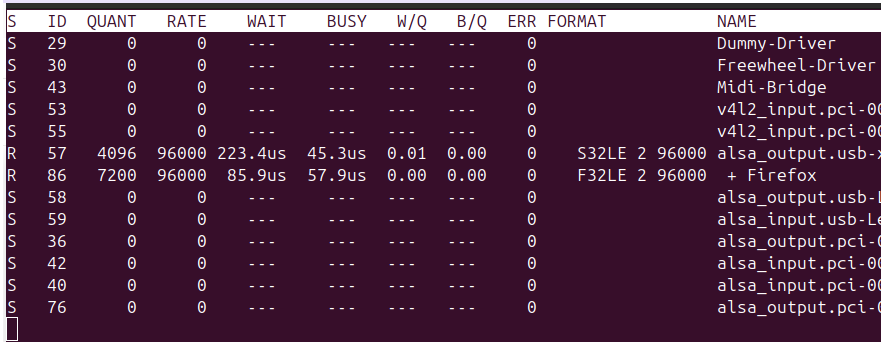
Notes:
I’m not use if this affects the bitrate, or what the bitrate is with pipewire as a default. In the .conf file theres a line that reads
#default.clock.min-quantum = 32
which would suggest that everything is 32 bit as default. I’m not sure how to verify the bitrate of the stream.